VOXI 号码如果换手机怎么办?官方是支持将 eSIM 转移的,eSIM换码是免费的,官方没有明确限制次数,但是还是需要注意一下,我在一个月内更换了两次,但是原电脑和网络环境下账户可以登录但是My account被拒绝访问的情况,换一台电脑后才恢复正常,猜测官方应该是有控制措施的。
官方支持免费转移eSIM,但是安装新卡是在外版iPhone上,第二次转卡是外版Pixel上都非常顺利,但第一次转移时用的实体esim卡,没有转移成功,提示绑定,所以有可能会遇到问题,这时候是可以和官方人工客服battle的,但是也比较简单,下面是整个实际操作过程。
一、登录官网,找到 Manage my SIM
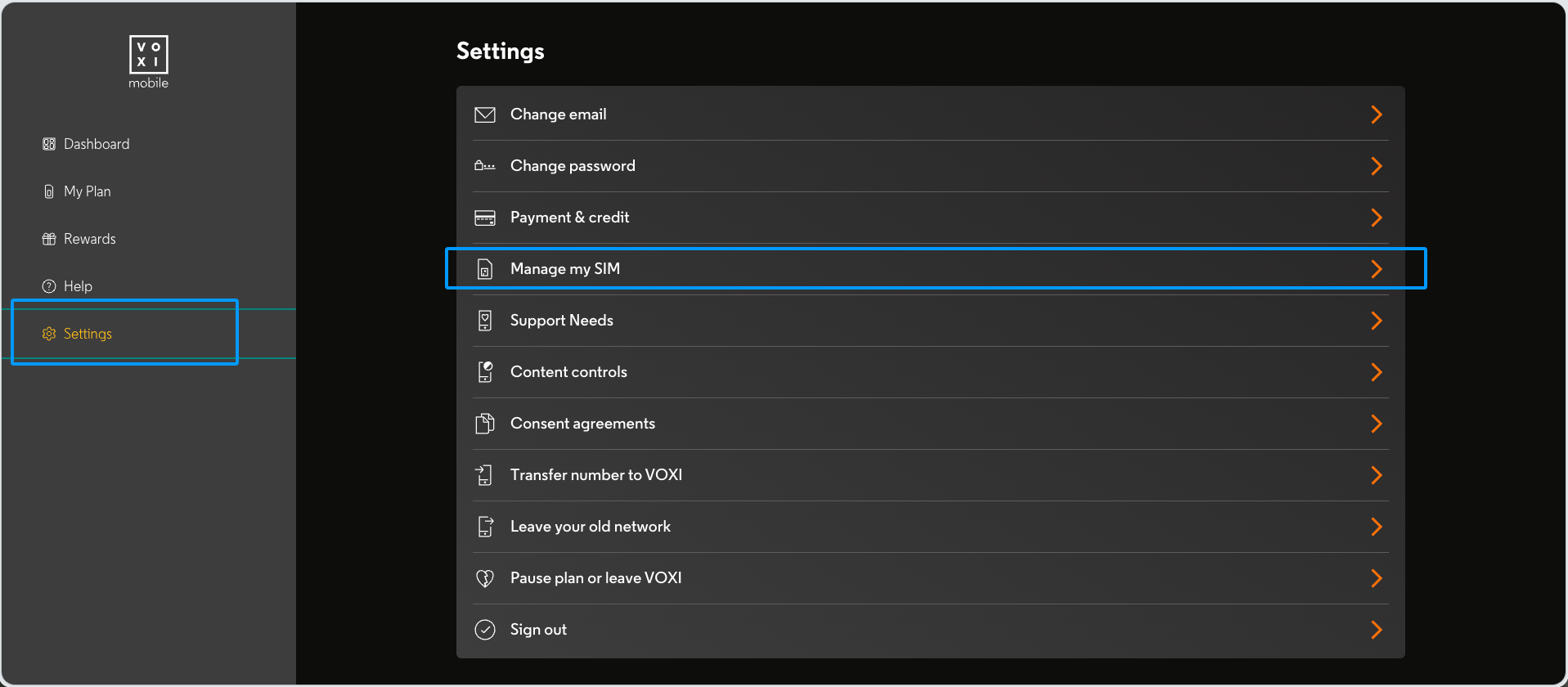
首先登录 VOXI 官网, My account → Settings → Manage my SIM。
二、选择 Transfer my eSIM
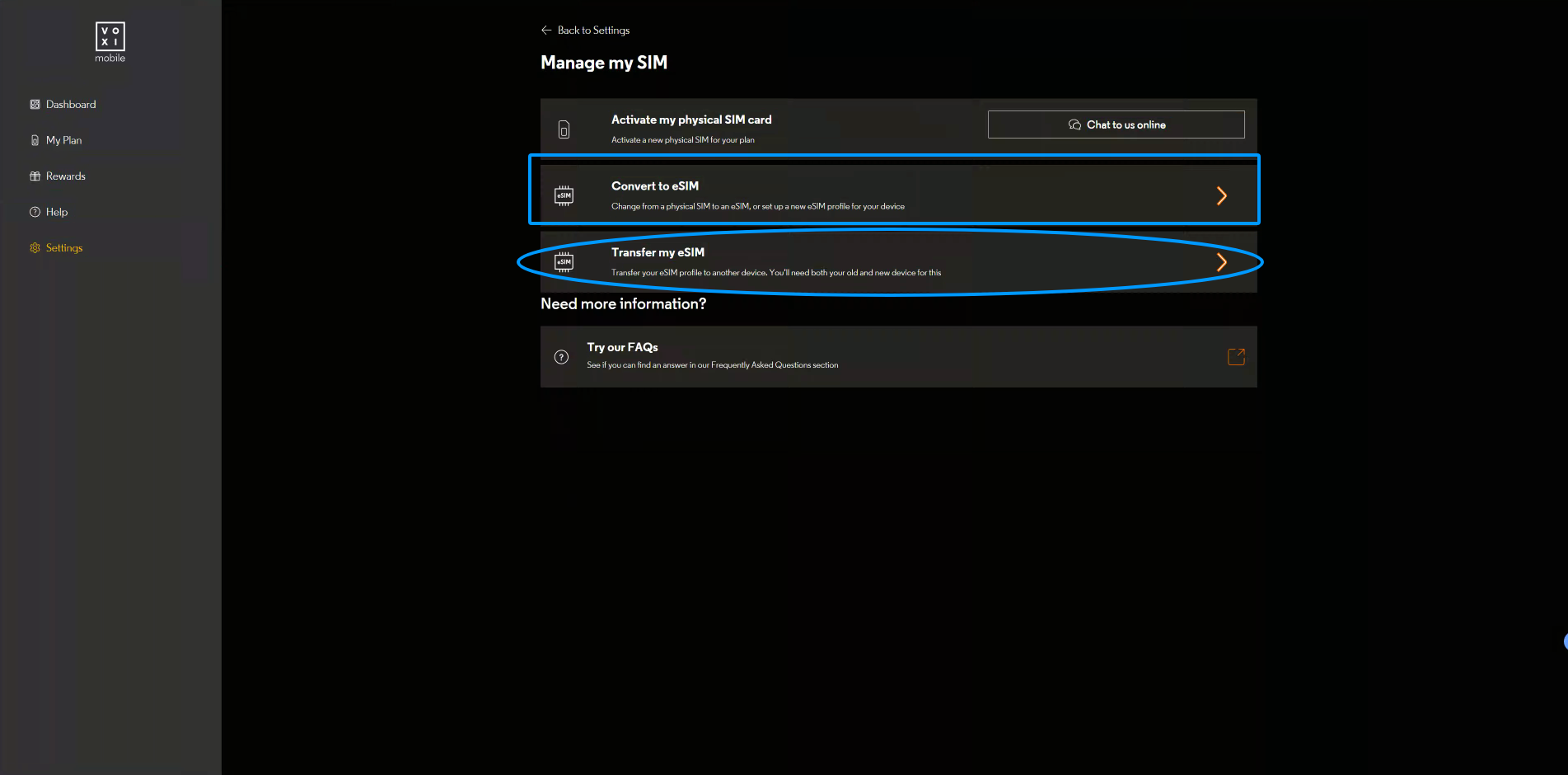
这个页面中,与 eSIM 相关的主要是两个入口:
- Convert to eSIM:把现有实体 SIM 转为 eSIM。
- Transfer my eSIM:将已经在用的 eSIM 转移到另一台设备。
第一个一般用不到,因为在国内我们拿不到实体卡,所以一般都是选择第二个 Transfer my eSIM。
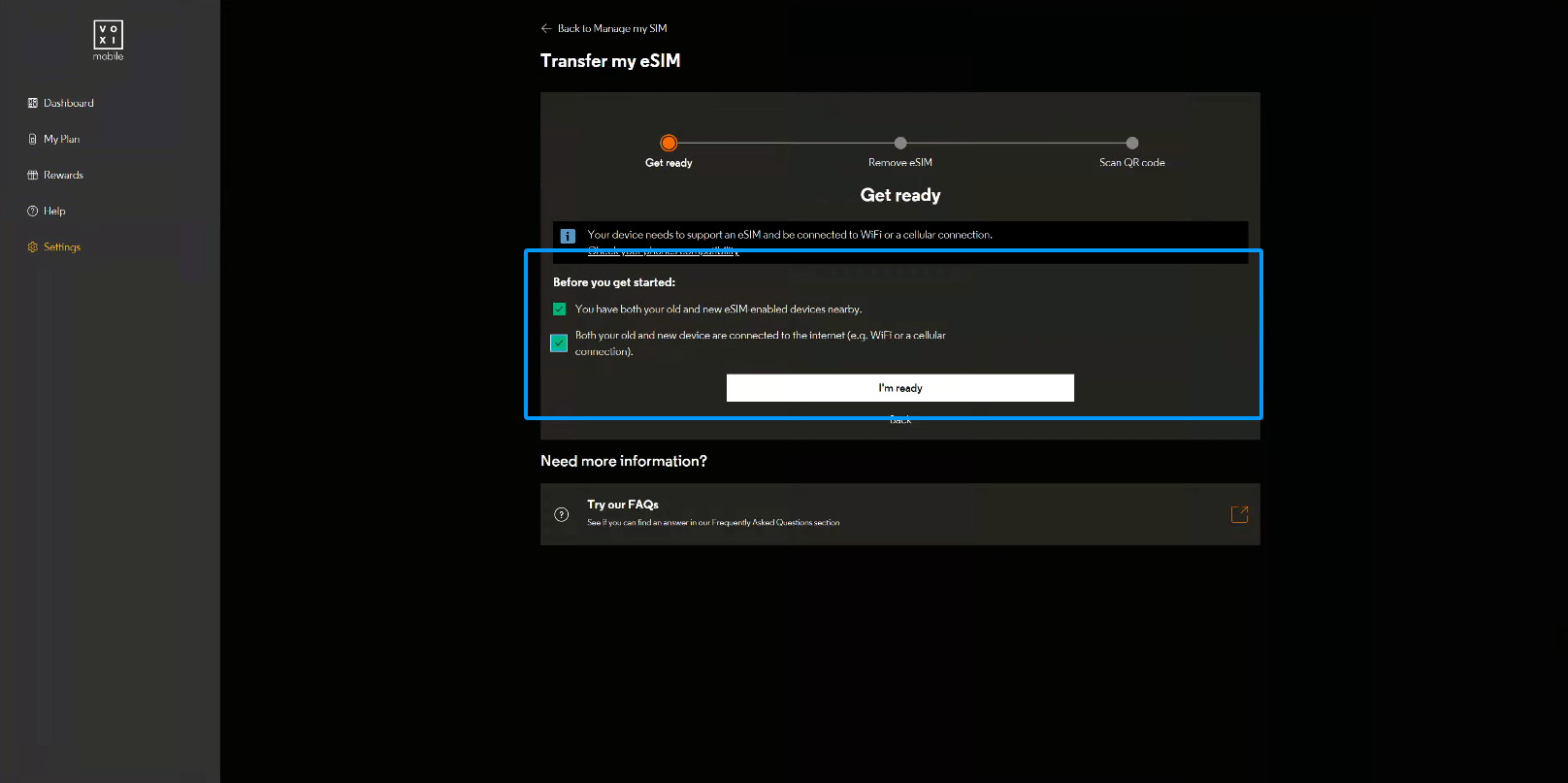
三、准备好新旧设备,再按提示处理旧 eSIM
进入转移流程后,页面会提示把旧手机和新手机都准备好,并确保两台设备可以联网。确认准备完成,再点击 I’m ready。
这里提醒大家:不要在登录账户、完成身份验证之前,就删掉旧 eSIM。 如果后续页面要求短信验证码,旧卡已经不能接收短信,会让处理变得更麻烦。
四、查看 Apple 或 Android 的删除说明
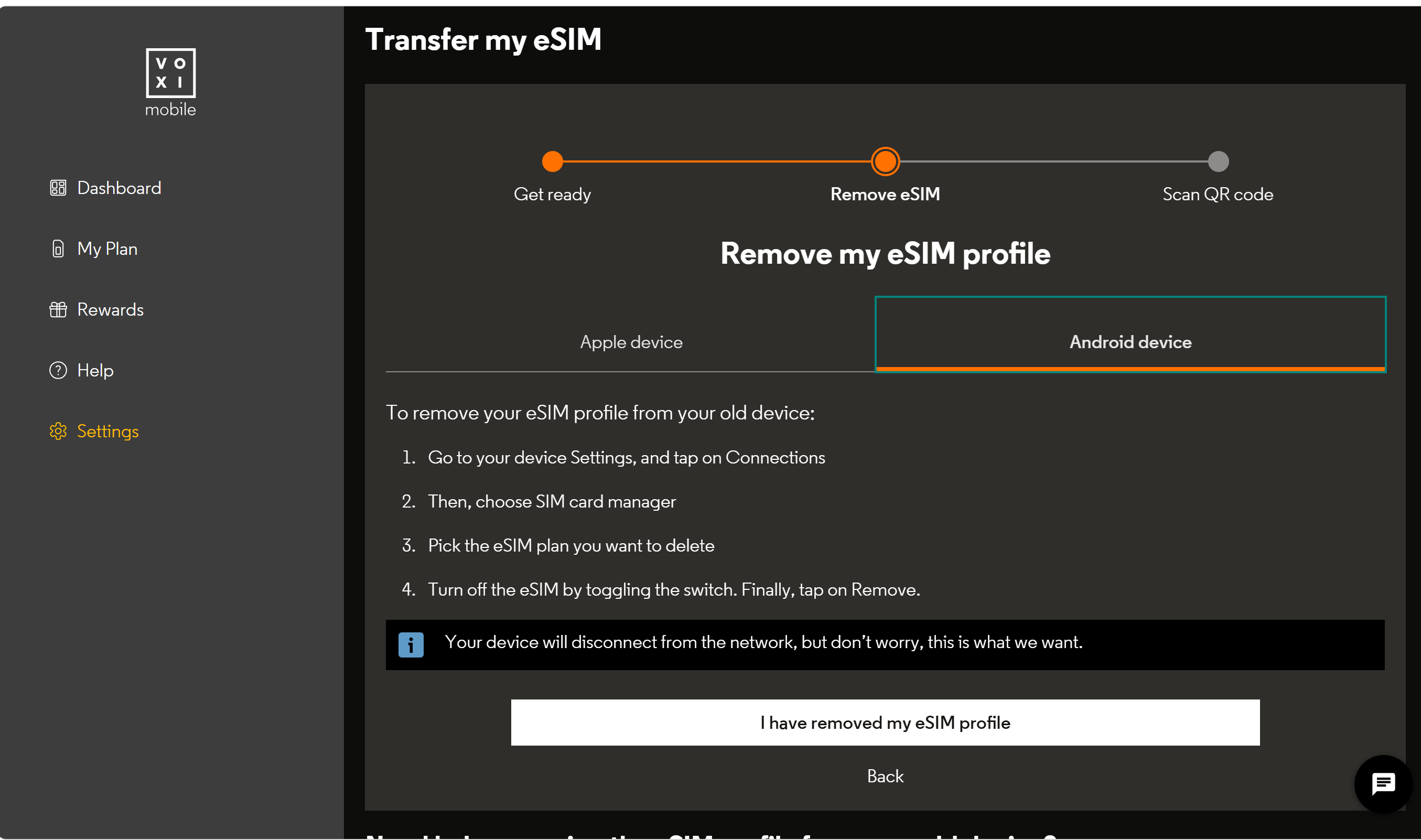
删除旧卡的时机根据指引转移流程来。
接下来会看到 Remove my eSIM profile 页面,并提供 Apple device 和 Android device 两种操作说明。
这里是删除对应设备中旧 eSIM,按实际设备查看即可。点击 I have removed my eSIM profile。使用实体 eSIM 卡载入配置选择Android。
五、扫描二维码,遇到报错转人工处理
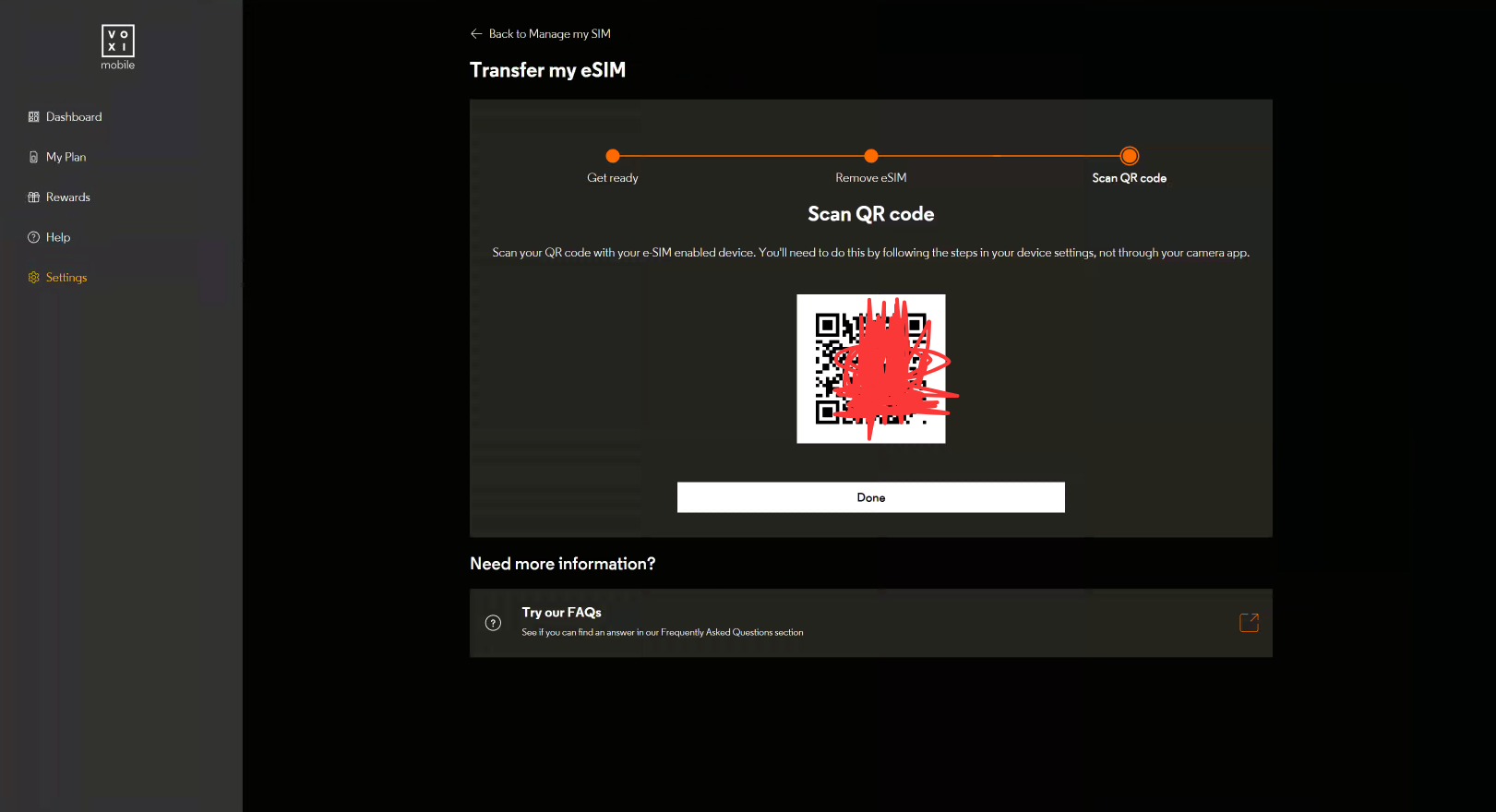
下一步,网页会给出 eSIM 安装二维码,按新设备的“添加 eSIM”流程扫描即可。本次后续遇到了安装失败,下面保留具体报错及处理经过。
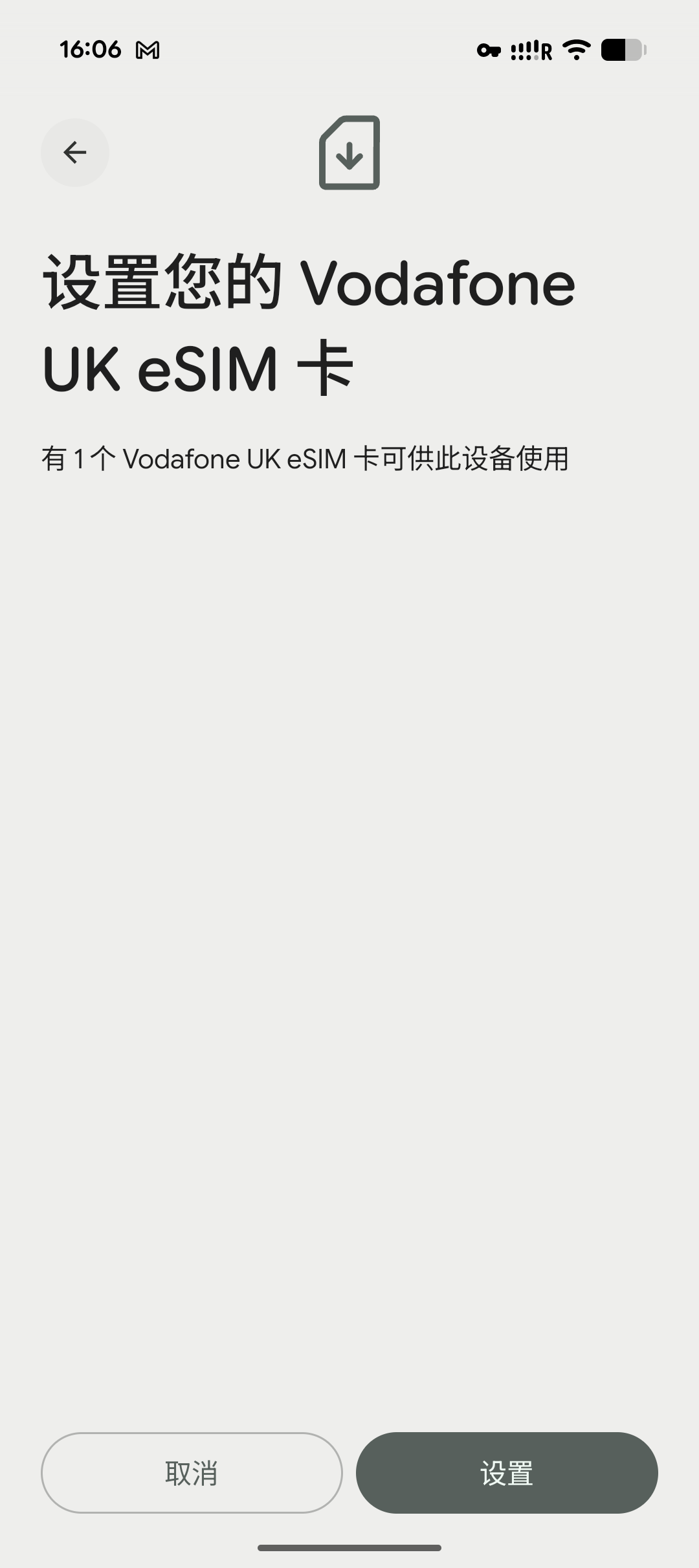
第一次转卡的时候,是转到实体eSIM中,提示:激活无效,EID 与预期值不匹配。
这时候就需要联系人工客服继续操作了。
六、返回账户,联系在线人工客服
重新进入 My account → Settings → Manage my SIM,点击 Chat to us online。
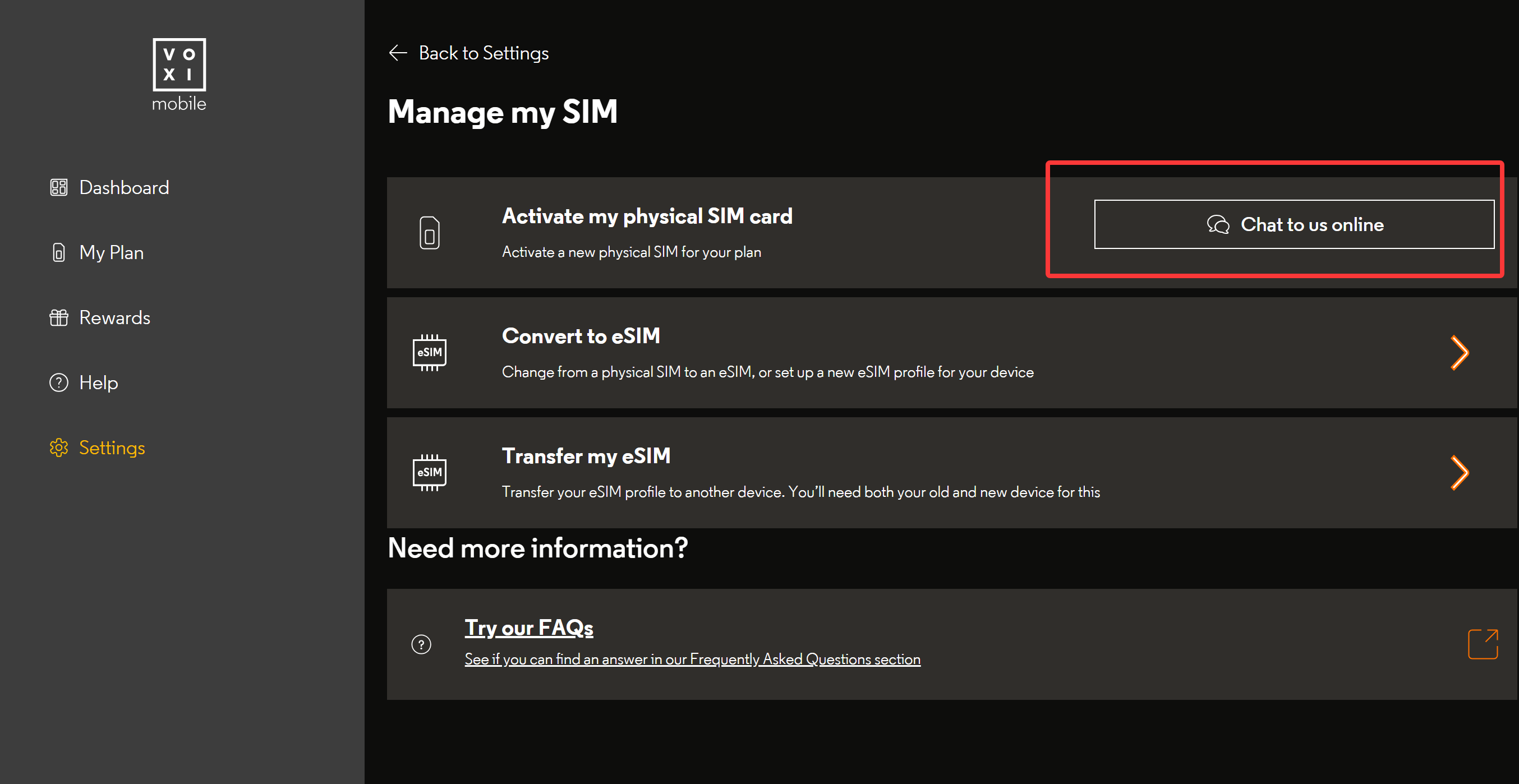
接下来就是和客服“battle”的过程了。不会英文也没问题,可以借助 AI 翻译问题和回复。
最开始接入的是机器人,输入两次 agent 后转到人工。
注意时间
我操作时页面列出的 VOXI 人工服务时间为(实际联系前仍以官网当前显示为准):
- 周一至周五:英国当地时间 08:00–22:00。
- 周六至周日:英国当地时间 08:00–20:00。
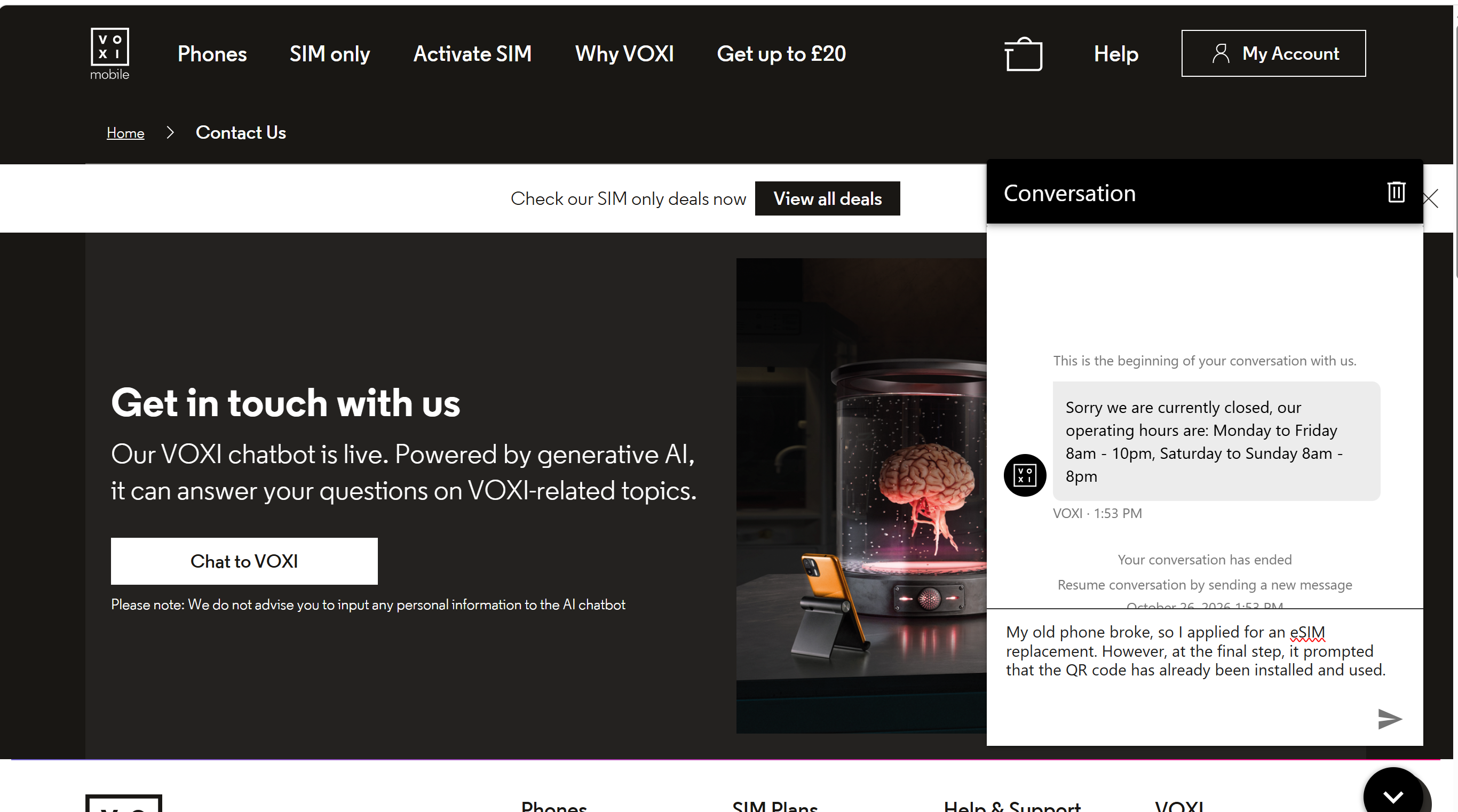
换算为北京时间需要区分英国冬令时与夏令时,也要区分工作日和周末。按上面的英国时段:冬令时工作日为 16:00–次日 06:00、周末为 16:00–次日 04:00;夏令时分别提前一小时。
换卡服务时段请按 VOXI 当前换卡页面或客服说明确认;不能把某次维护或等待时段推广为所有英国号卡的统一限制。
七、客服沟通实录:英文原文与中文对照
下面按原顺序保留这次客服沟通的英文原文,并逐轮附上中文对照。英文中的原有拼写、语法和个人信息占位符均保留。
角色说明:我(customer)是我的回复,机器人(workflow)是自动流程,人工客服(agent)是接通人工后的回复。
1. 说明报错,由机器人收集信息
我(customer)
I recently switched to an eSIM, but during installation, received an error stating that activation is invalid because the EID does not match the expected value.
中文:我最近换成了 eSIM,但安装时提示激活无效,因为 EID 与预期值不匹配。
机器人(workflow)
Please note this conversation may be recorded for training and quality purposes. For more information on how we handle your personal data please visit our privacy policy at 【隐私政策跟踪链接已省略】
中文:请注意,本次对话可能会被记录,用于培训和质量管理。有关我们如何处理您的个人数据,请查看我们的隐私政策。【隐私政策跟踪链接已省略】
机器人(workflow)
What is your phone number?
中文:您的手机号码是什么?
我(customer)
[phone]
中文:【手机号】
机器人(workflow)
What is your email address?
中文:您的电子邮箱地址是什么?
我(customer)
[email]
中文:【邮箱地址】
机器人(workflow)
Would you like a copy of this chat sent to this email address?
中文:您希望将本次聊天记录副本发送到这个邮箱吗?
我(customer)
Yes
中文:是的。
机器人(workflow)
To ensure our team can provide the best care and support, do you have any needs or circumstances we should be aware of?
中文:为了让我们的团队提供更好的服务和支持,您是否有需要我们了解的需求或情况?
我(customer)
No
中文:没有。
机器人(workflow)
Are you an existing customer?
中文:您是现有客户吗?
我(customer)
Yes
中文:是的。
机器人(workflow)
Transferring you to an agent now.
中文:现在为您转接人工客服。
2. 接入人工,完成账户核验
人工客服(agent)
Welcome! You’re now chatting with a live agent “Suhail” from Vodafone/VOXI webchat Team, and I’ll be responding right away. To ensure we stay connected, I recommend remaining on this chat, as staying away from the chat for 6 minutes may close the session.
中文:欢迎!您现在正在与 Vodafone/VOXI 在线客服团队的人工客服“Suhail”聊天,我会立即回复。为保持联系,建议您留在聊天窗口,因为离开聊天窗口 6 分钟可能会导致会话关闭。
我(customer)
I recently switched to an eSIM, but during installation, received an error stating that activation is invalid because the EID does not match the expected value.
中文:我最近换成了 eSIM,但安装时提示激活无效,因为 EID 与预期值不匹配。
人工客服(agent)
I am sorry for the hassle,
中文:很抱歉给您带来麻烦。
人工客服(agent)
I understand you wish to activate your esim , I will surely help you with this.
中文:我了解到您希望激活 eSIM,我一定会帮助您处理。
人工客服(agent)
May I request for your registered full name and mobile number on account please.
中文:请提供您账户登记的完整姓名和手机号码。
我(customer)
[phone] [name]
中文:【手机号】 【姓名】
人工客服(agent)
[name] Please confirm [user info] and [user info] digit of your voxi account pin
中文:[name],请确认您 VOXI 账户 PIN 的第 [user info] 位和第 [user info] 位数字。
我(customer)
[phone]
中文:【原记录中的脱敏占位符;上一句客服要求的是 PIN 指定位置的数字。】
人工客服(agent)
Perfect, Jhonny, This matches on account, allow me few moments to check the details.
中文:好的,Jhonny,这与账户上的信息一致。请稍等片刻,我查看一下详细信息。
人工客服(agent)
Please confirm registered email address and current or last plan details on account.
中文:请确认您的注册邮箱,以及账户当前或最近一次套餐的详细信息。
我(customer)
[email]
中文:【邮箱地址】
我(customer)
paygo
中文:按量付费(pay as you go)。
人工客服(agent)
Please confirm you last plan amount and date .
中文:请确认您上一次套餐的金额和日期。
我(customer)
[sensitive data] for £10/month
中文:【已隐藏的信息】,每月 £10。
我(customer)
you mean this
中文:您指的是这个吗?
3. 申请新的 eSIM,确认邮件接收方式
请注意,客服一般会要你手机的EID号,如果是国行手机用实体eSIM安装,要求他二维码发邮箱
人工客服(agent)
Yes, I am raising request for your new esim.
中文:是的,我正在为您提交新的 eSIM 申请。
人工客服(agent)
Please confirm Eid Number of your device which you will get by dialing [sensitive data] from your device.
中文:请确认您设备的 EID 号码,您可以在设备上拨打 [sensitive data] 来查看。
我(customer)
Can I receive the QR code directly via email
中文:我能直接通过电子邮件接收二维码吗?
人工客服(agent)
Yes.
中文:可以。
人工客服(agent)
Could you please recheck your email address?
中文:您能再核对一次邮箱地址吗?
我(customer)
[email]
中文:【邮箱地址】
人工客服(agent)
[name] I have raised request for your new esim and it will be shared on your registered email address with in few minutes up to [sensitive data] hours.
中文:[name],我已经为您提交新的 eSIM 申请,会在几分钟到最多 [sensitive data] 小时内发送到您的注册邮箱。
人工客服(agent)
Johnny*
中文:Johnny*(客服更正了前面的姓名拼写。)
我(customer)
Thanks
中文:谢谢。
4. 收到邮件,客服追问使用结果
人工客服(agent)
Please check if you have received any email regarding your esim.
中文:请检查是否收到与您的 eSIM 有关的邮件。
人工客服(agent)
if yes then please scan the qr code attached in that email and if it asks for any password it will be your registered DOB in format of DD/MM/YY.
中文:如果收到了,请扫描邮件附件中的二维码。如果要求输入密码,密码是您登记的出生日期,格式为 DD/MM/YY。
我(customer)
got it
中文:收到了。
我(customer)
Thanks
中文:谢谢。
只想维持号码有效,可看 VOXI 短信保号实测;需要了解另一种接入方式,可看 VOXI Wi-Fi Calling 实测与官方境外限制。三篇分别处理换机、保号和通话接入,不应混作同一项开通服务。
发布者:1taoqi,转转请注明出处:https://1taoqi.com/voxi-esim/
 微信扫一扫